Blog / Engineering
Why full-text log search is hard in observability
One would think that text search is a solved problem. Inverted indexes, substring search, trigram indexes, and the histogram that makes log search expensive.

Log search looks solved, but an inverted index only matches whole terms, so a search for “exception” misses “nullpointerexception”. Substring search fixes that at a cost: positions grow the index and still scan the term dictionary, a trigram index only prunes candidates, and a raw scan is too slow at scale. The histogram is the expensive query.
One would think that text search is a solved problem. A cursory look at the Wikipedia entry for full-text search shows that we have been trying to solve this since the 1960s, and more directly since the 1990s. To an extent, this is true — more on this in a bit. We have Lucene, which is the de facto standard for text search, and the more recent Tantivy (written in Rust) is also heavily inspired by Lucene’s design. While these libraries do give the primitives to build a search system, by themselves, they do not give a full solution.
Let’s dig a bit deeper into text search within an observability system so we understand the nitty-gritties better.
Full-text search is not equal to substring search
Lucene, and everything inspired by it, is built around a data structure called an inverted index. For every document entering the system, a tokenizer splits the log line string into terms and adds its docId (or rowId) to this inverted index. It’s essentially a glorified hash map from a term to the list of docIds where this term is present (also commonly referred to as a posting list).
Consider this log line that is being processed.
2026-10-22T10:41:03Z ERROR c.s.payment.PaymentService - java.lang.NullPointerException
charge failed order_id=9f3c2a1e user=48291 reason=card_declined code=do_not_honor
A simple tokenizer — one that lowercases and splits on special characters — produces terms and adds them into the index. Below is a part of the inverted index containing some of the terms from this log line (this particular log line is docId 7).
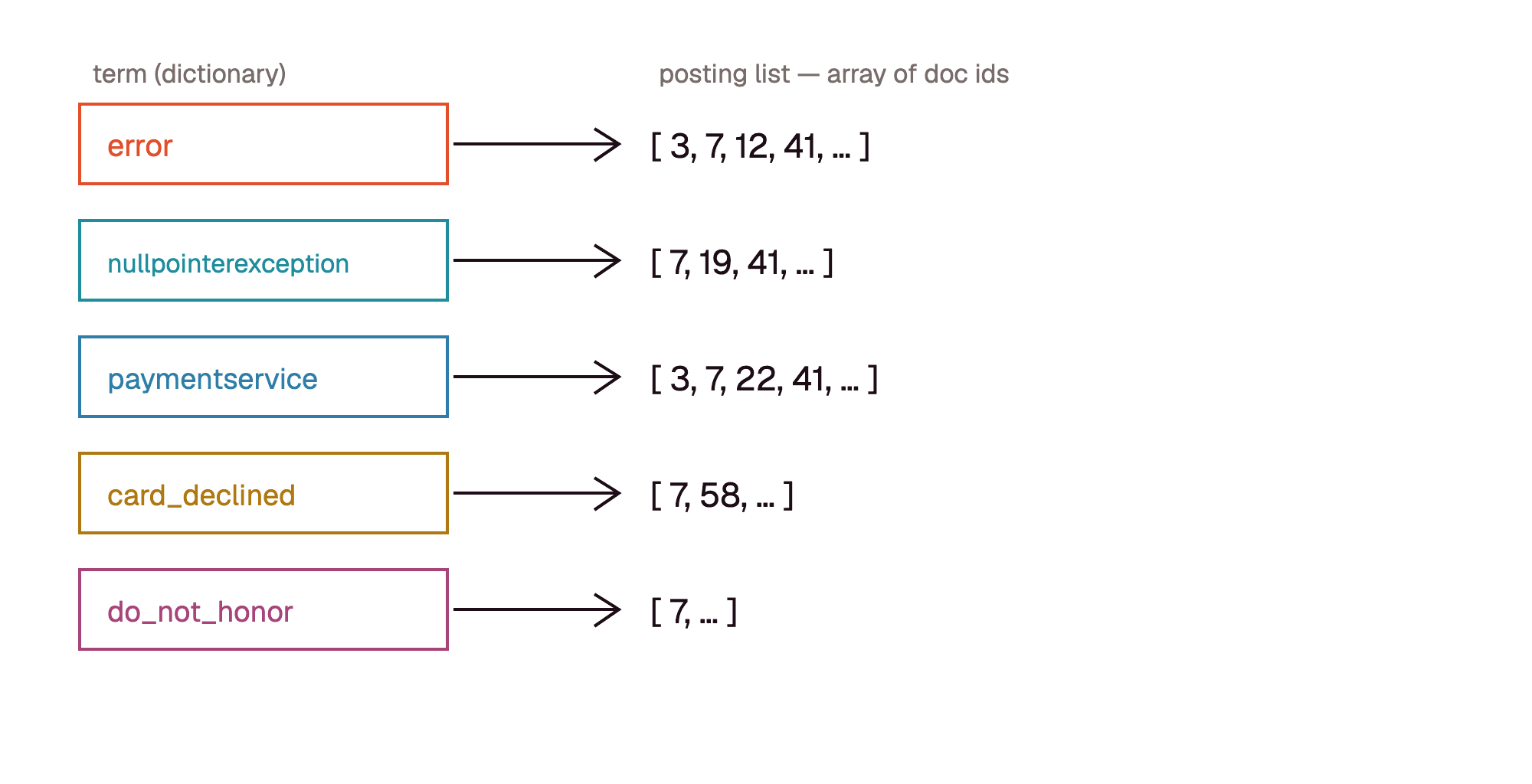
This term inverted index works great when users search for a full term. We can look up the term in the index and get its doc ids without even reading the log lines. The problem is that users have to search for a full term; partial terms won’t match in the index. So users have to be aware of tokenization to be able to search for something.
As an example, if someone simply searches for “exception”, this particular log line will not be a match, because “exception” was not a term produced — but “nullpointerexception” was.
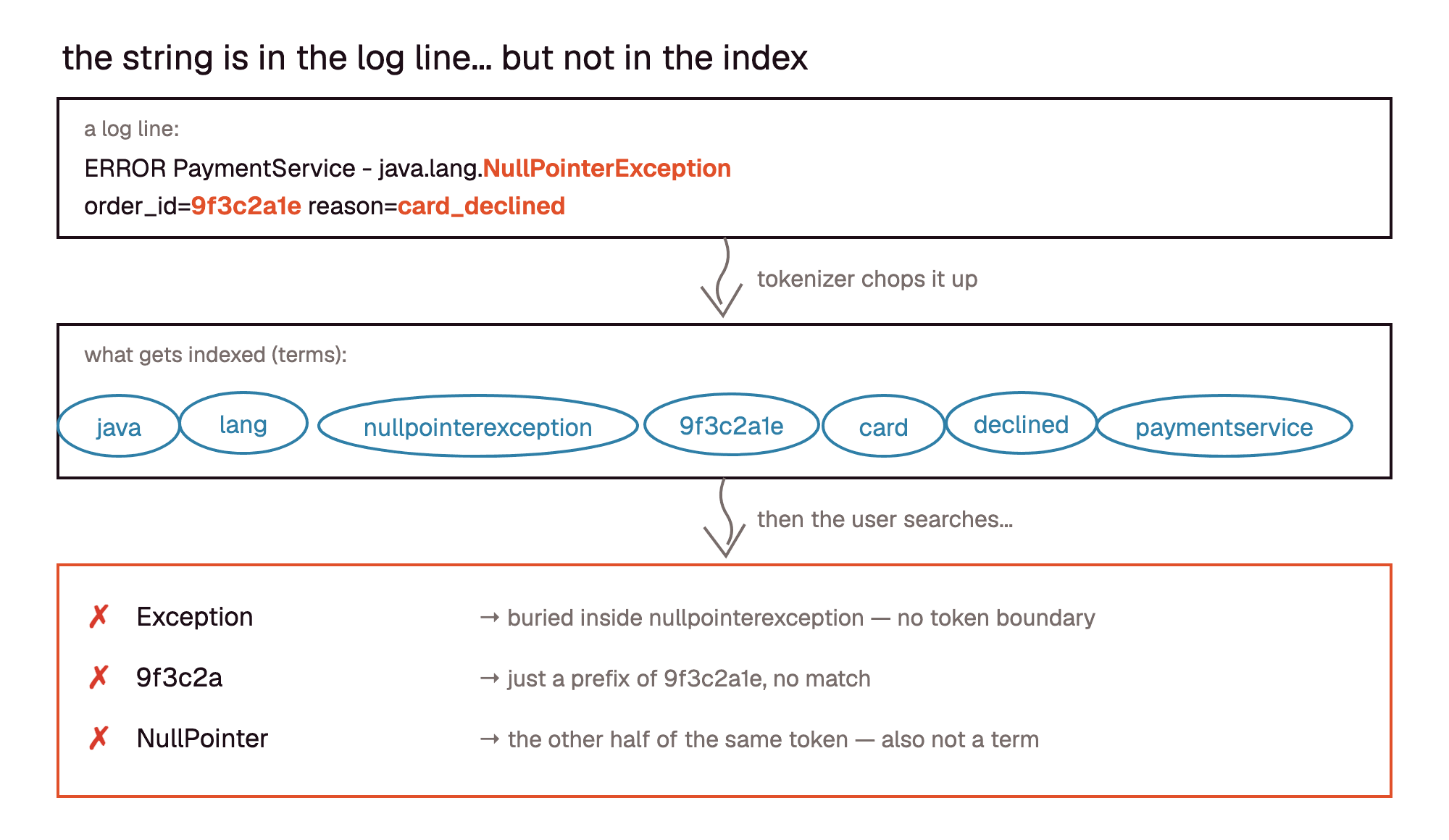
To make things more intuitive for users, we can introduce a full “substring search” in the system. This allows users to tell the system that they want exact substring search semantics. As a user, if I know that what I am looking for is a full term, I can use “term search”; otherwise I can toggle to substring search.
This is a fairly reasonable trade-off. The trouble is that substring search is deceptively hard to implement, and, unfortunately, none of the options are perfect. Let’s look at some of them.
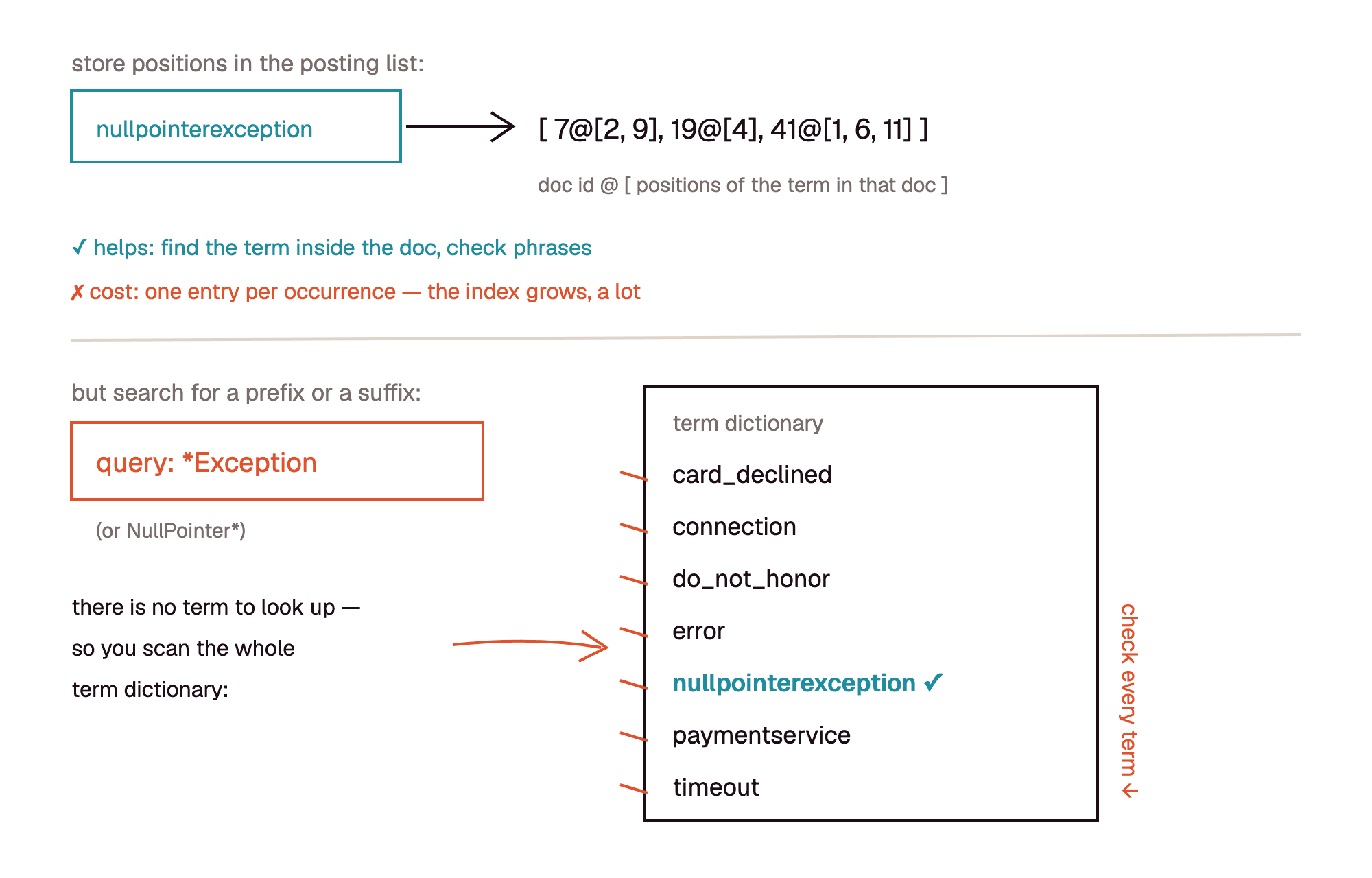
Store positions in the inverted index. Lucene already supports this, and it partially solves the problem. It also grows the index significantly. While storage cost may be an acceptable trade-off, the bigger problem is that a prefix match leads to a scan on the terms in the inverted index. (A suffix match can be optimized with a binary search.)
Index n-grams. Instead of indexing terms, we can index n-grams (typically trigrams). The size of the index grows — again, a potentially acceptable trade-off. But note that n-grams in the index only prune docs; we still have to verify by scanning the log lines.
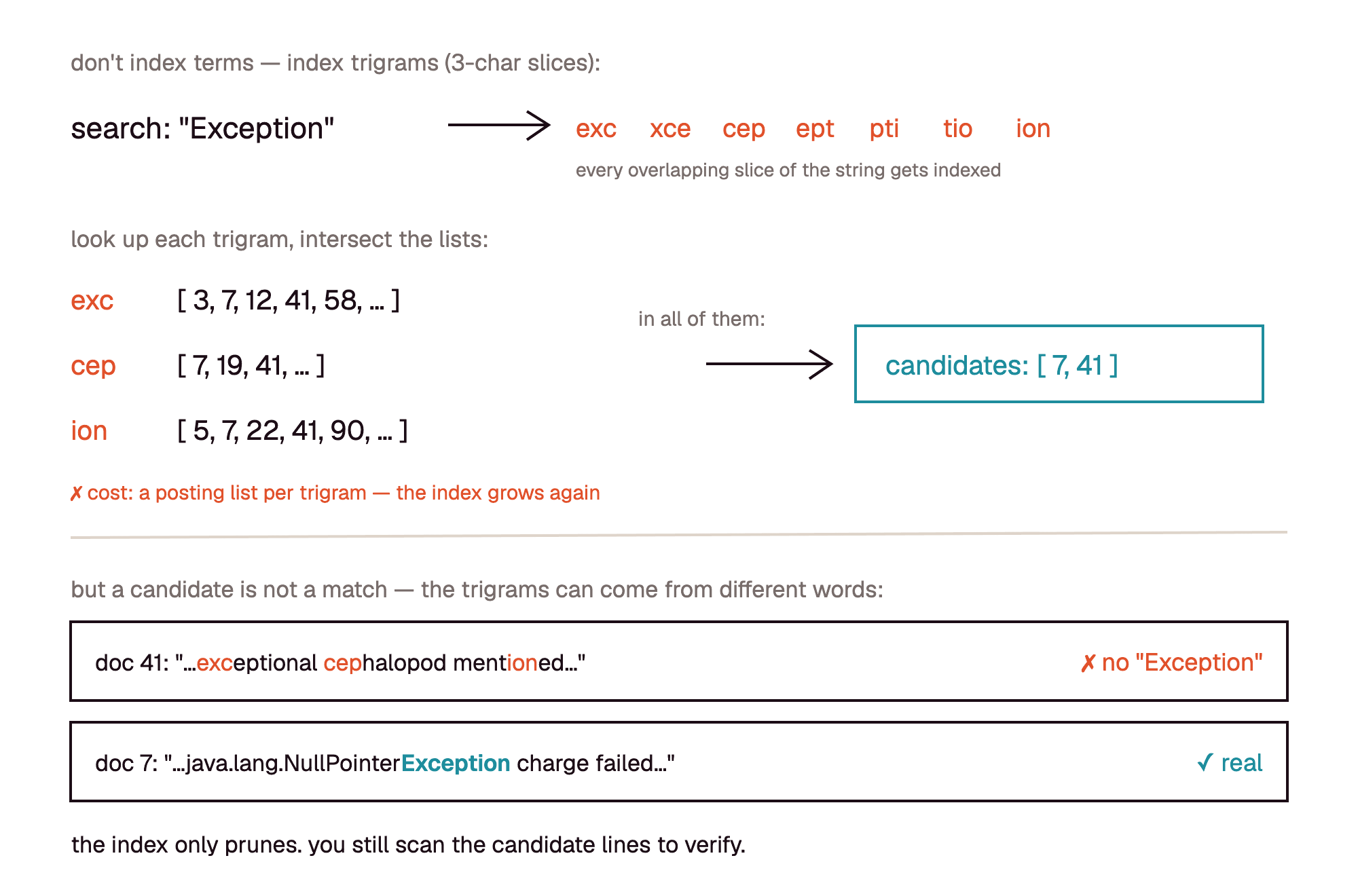
No index, only scan. Grep the raw log lines. There is no size overhead at all, but at scale it becomes too slow.
What a logs system actually looks like
Beyond all of this, there is another complexity in building a logs search system. Lemme illustrate with the image below. This is what a typical logs system UI page looks like.
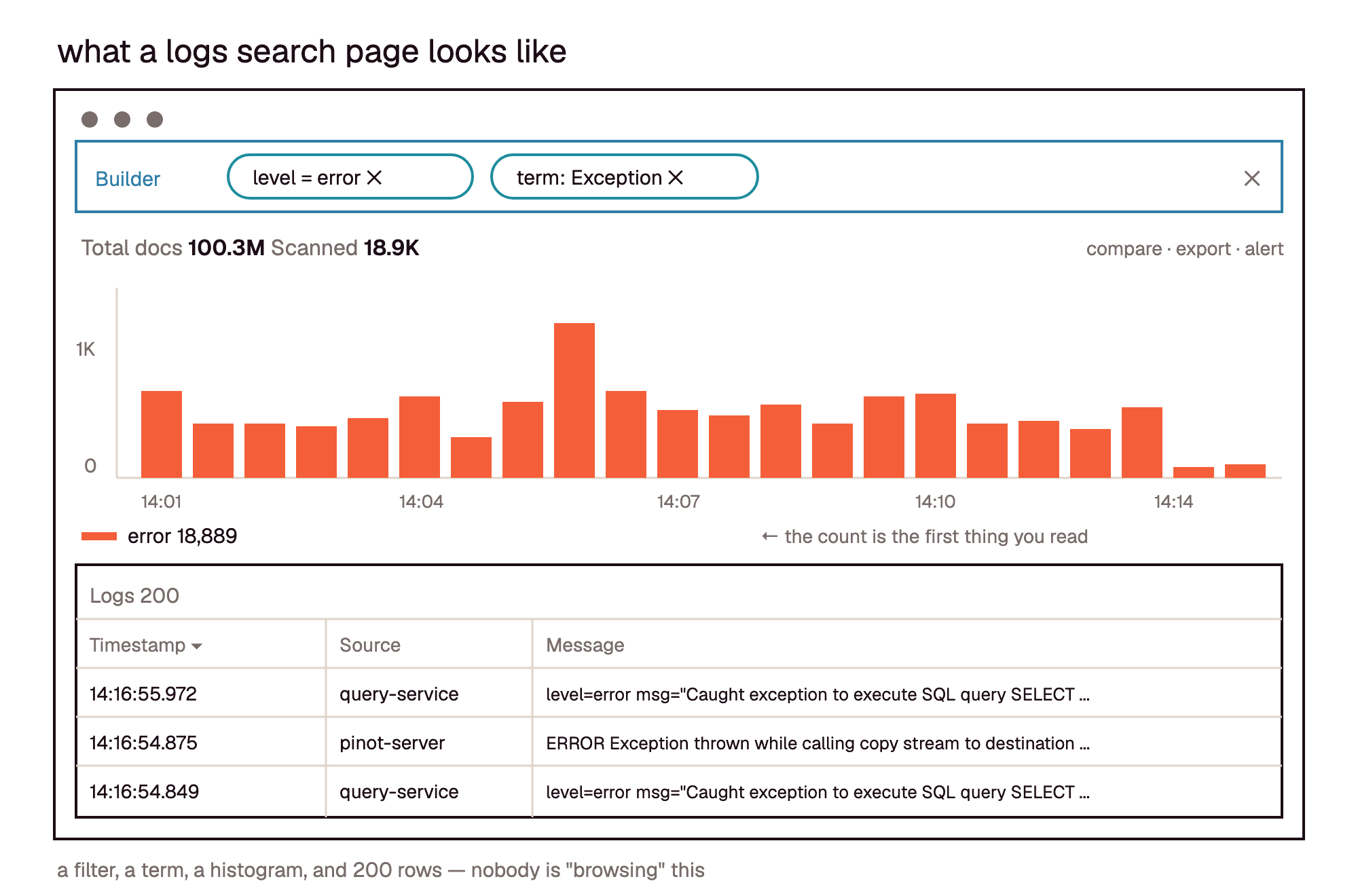
Along with the actual logs, we also show a bar graph histogram at the top. It carries crucial information: how many matches occur over time. We don’t think about it much, but this graph (and other places where we count) is really what makes searching expensive on the underlying database.
Think of it as two different SQL queries.
Below is the query for the log list. Optimization-wise, this query has the benefit of stopping after it finds exactly 100 results.
select timestamp, log, source from logs where <filter> and
timestamp between startTs and endTs
order by timestamp desc limit 100
And below is the query for the histogram. This query has to count everything in the selected time range: filter, count and aggregate it.
select timeBucket, count(*) from logs
where <filter> and timestamp between startTs and endTs
group by timeBucket
The more logs the filters match, the more work our system has to do to produce this histogram. So the amount of work is proportional to the amount of data that is matched. And without a perfect index, we may end up reading a lot of data for this query.
Conclusion
In this article, we discussed why logs search is a hard problem, even though we have had many decades of experience building and operating large search engines. Observability systems today have to handle a tremendous volume of data, provide fast query response times and keep cost under control, and we have AI agents querying at a much higher rate than users would by hand.
As a systems engineer, this is an old and still fascinating problem domain to be working on. Challenges like this in the observability domain are what keep me motivated in my daily job.
Frequently asked questions
Why is full-text search in logs hard at scale?
An inverted index only finds whole terms, but people search logs for fragments. Every way to support substring search has a cost: storing positions grows the index and still scans the term dictionary for prefixes, n-grams only prune candidates, and scanning raw lines is too slow at scale. On top of that, the histogram on a logs page has to count every match in the time range.
What’s the difference between full-text search and substring search in log tools?
Full-text search looks up whole tokens produced by the tokenizer, so “exception” does not match “nullpointerexception”. Substring search matches any part of the log line, which is more intuitive but much harder to index.
How do observability platforms index logs for fast search?
Most build on an inverted index: a tokenizer splits each log line into terms, and each term points to a posting list of the documents that contain it. Some also store term positions or index n-grams so that partial matches can be found, at the cost of a larger index.
Inverted index vs trigram index vs scanning: what works best for log search?
None is perfect. An inverted index is fast for whole terms but misses fragments. A trigram index finds fragments but only prunes candidates, so the matching lines still have to be scanned to verify. Scanning raw lines needs no index at all but becomes too slow at scale.
Why is the histogram on a logs search page expensive?
The log list can stop after the first 100 matches. The histogram has to filter, count and aggregate every match in the time range, so its cost grows with the amount of data the filter matches.